
Flickering lights can be annoying, but they can also be a warning sign. Sometimes the cause is simple, like a loose bulb or a bad lamp. Other times, lights turning on and off by themselves can point to a faulty light switch, loose electrical connection, overloaded circuit, or electrical wiring issue. That is why it is smart to pay attention. A light that flickers once may not be a big deal. A light that keeps doing it should not be ignored.
This guide explains the most common causes of flickering lights in homes and businesses. It also explains which signs are more serious, what safe checks you can do, and when to call an electrician. The goal is not to scare you. It is to help you know the difference between a small fix and a safety concern. Electrical problems can hide behind walls, switches, panels, and fixtures. So, if something feels off, it is better to check it early than wait for a bigger problem.
Why Do Flickering Lights Happen?
Flickering lights happen when the flow of power to the light is not steady. That can be caused by the bulb, fixture, switch, wiring, circuit, or even the utility power coming into the building. Some causes are minor. Others can be unsafe. The pattern matters, so watch when and where the flicker happens.
Is It Just a Loose Bulb?
A loose bulb is one of the easiest causes to check. If the bulb is not seated well, the light may blink, flicker, or turn off when someone walks nearby. This is common with lamps, ceiling fixtures, and bulbs that were not tightened fully. Turn the light off first. Let the bulb cool. Then check it carefully.
If the flicker stops after the bulb is tightened, the problem may be solved. Still, watch it for a few days. If it starts again, the issue may be the socket, fixture, or wiring. Do not keep forcing a bulb into a damaged socket. That can make the problem worse.
Could the Bulb Be Bad?
Yes, a bad bulb can cause flickering lights. LED bulbs can fail, especially if they are low quality, old, or used with the wrong dimmer. A bulb may also flicker before it burns out. Try replacing the bulb with a known good bulb of the right type. That is a safe first step.
If the new bulb works fine, the old bulb was likely the issue. If the new bulb flickers too, the cause is probably somewhere else. It could be the fixture, switch, dimmer, or wiring. That is when you should stop guessing and look deeper.
When Are Flickering Lights a Safety Concern?
Flickering lights are a safety concern when they happen often, affect more than one area, or come with heat, buzzing, burning smells, sparks, or tripping breakers. Those signs can point to a loose electrical connection or a wiring problem. Do not treat those signs as normal. They need attention.
What Warning Signs Should You Take Seriously?
Take warning signs seriously if you smell burning, see scorch marks, feel a warm switch, or hear buzzing from a light, outlet, or panel. These signs can mean heat is building up where it should not. That can be dangerous. Turn off the affected light or circuit if you can do it safely.
Also pay attention to repeated breaker trips. A breaker is a safety device. It is not there to annoy you. If it keeps tripping, something may be overloaded or damaged. Do not keep resetting it again and again. That is not a fix.
What If the Whole House Flickers?
If the whole house flickers, the issue may be bigger than one light. It could be a utility issue, service problem, panel issue, or loose connection. If nearby homes flicker too, the utility may be involved. If only your building has the issue, an electrician should check the system.
Whole-house flicker can also happen when a large appliance starts. A quick dim when an air conditioner starts may happen in some homes. But strong, repeated, or worsening flicker is not something to ignore. It needs a real check.
Can a Faulty Light Switch Cause Flickering Lights?
A faulty light switch can cause flickering lights when the switch no longer makes a steady connection. The light may blink when you touch the switch. It may turn off and on with small movement. You may also hear crackling or feel heat near the switch. That is a sign to stop using it.
How Can You Spot a Bad Switch?
You can spot a bad switch by watching how the light acts when the switch is used. If the light flickers only when the switch is touched, the switch may be loose or worn out. If the switch feels warm, looks discolored, or makes noise, that is more serious.
Do not open the switch box unless you know what you are doing. Even a simple switch can have live power inside. Turn the light off and call an electrician if the switch seems damaged. A switch is cheap compared with fire damage. Real talk.
Can Dimmer Switches Cause Flicker?
Yes, dimmer switches can cause flicker when they do not match the bulb type. Many LED bulbs need LED-rated dimmers. If an old dimmer is used with new LED bulbs, the light may flash, buzz, or turn off at low settings. This is common.
The fix may be as simple as using compatible bulbs or replacing the dimmer. But the wiring should still be safe. If the dimmer is hot, buzzing loudly, or smells strange, stop using it. That is not just a bulb issue. It needs a check.
Can a Loose Electrical Connection Make Lights Turn On and Off?
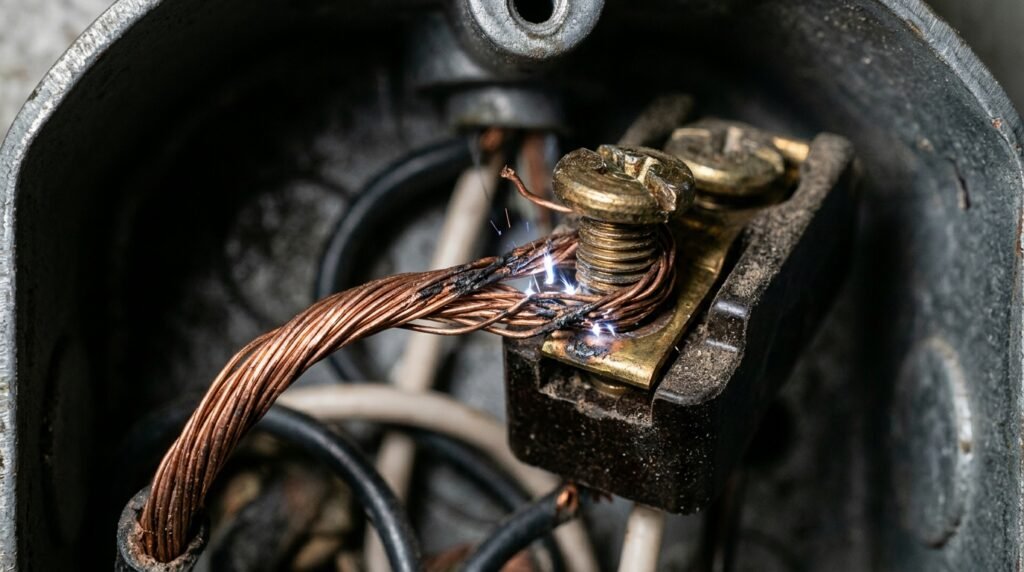
A loose electrical connection can make lights turn on and off because power is not flowing smoothly. This can happen in a fixture, switch box, outlet, junction box, or panel. Loose connections can create heat and arcing. That makes them more serious than a bad bulb.
Why Are Loose Connections Dangerous?
Loose connections are dangerous because electricity can jump across small gaps. That can create heat, sparks, and damage. The light may flicker at first, but the real problem may be hidden behind the wall or inside the fixture. That is why repeat flicker matters.
You may notice the light changes when a wall is tapped, a switch is touched, or a nearby outlet is used. That can point to movement in the connection. Do not ignore it. A licensed electrician can test the circuit and fix the connection safely.
What If One Room Has Several Flickering Lights?
If one room has several flickering lights, the issue may be tied to that circuit. It could be a loose neutral, overloaded circuit, bad switch leg, or wiring problem. The lights may not be the real cause. They may just be showing the problem.
This is where DIY guesses can get risky. Replacing one bulb after another will not fix a circuit issue. If several lights act strange in the same area, call an electrician. The pattern is important, and a trained person can trace it safely.
Can an Electrical Wiring Issue Cause Lights to Turn Off by Themselves?
An electrical wiring issue can cause lights to turn off by themselves when the wiring is damaged, loose, overloaded, or poorly installed. The light may work for a while, then blink out. It may return later. That kind of random behavior can be frustrating, but it can also be a warning.
What Wiring Problems Can Cause Flicker?
Wiring problems that can cause flicker include loose wires, damaged wires, old connections, poor splices, and overloaded circuits. In older buildings, past repairs may also be part of the issue. Someone may have added fixtures, outlets, or switches without checking the full load.
Businesses can run into this too. Adding signs, equipment, displays, lights, or workstations can push a circuit harder than before. The lights may flicker when equipment starts. That is a clue. The circuit may need review, not just a new bulb.
Why Should You Avoid DIY Wiring Repairs?
You should avoid DIY wiring repairs because electrical work can hurt people and damage property when done wrong. A wire may look simple, but the circuit may not be. There may be shared neutrals, hidden junctions, old wiring, or panel issues involved. Guessing is unsafe.
Simple checks are okay. You can change a bulb. You can make sure a lamp is plugged in. You can check if a breaker tripped. But opening switches, fixtures, panels, or junction boxes should be left to a licensed electrician. No shame in that. It is the safer move.
Can Overloaded Circuits Cause Flickering Lights?
Overloaded circuits can cause flickering lights when too many devices pull power from the same circuit. The lights may dim when a vacuum, microwave, heater, printer, or power tool turns on. The circuit may also trip. This is common in older homes and busy business spaces.
What Are Signs of an Overloaded Circuit?
Signs of an overloaded circuit include flickering lights, frequent breaker trips, buzzing outlets, warm switches, and power loss when large devices run. You may also notice that one area has too many plugs, power strips, or extension cords. That is a clue.
Do not solve this by using more power strips. That only hides the problem. Large devices should use proper circuits. If a circuit keeps struggling, an electrician can check the load and suggest a safe fix. Sometimes a new circuit is needed.
Why Do Large Appliances Make Lights Dim?
Large appliances can make lights dim because they draw more power when they start. Air conditioners, refrigerators, pumps, heaters, and compressors can cause a brief dip. A small, quick dim may be normal in some buildings. But strong or repeated dimming can point to a bigger issue.
If the lights dim hard, stay dim, or flicker in several rooms, get it checked. The panel, service, or circuit may need attention. For businesses, this matters even more because equipment problems can slow work and damage machines.
Can the Electric Company Cause Flickering Lights?
The electric company can be part of the issue if the problem comes from the utility side. This may happen during storms, outages, grid work, damaged lines, or service problems. If several nearby homes or businesses have flickering lights at the same time, the utility may need to inspect the area.
How Can You Tell If It Is a Utility Issue?
You can tell it may be a utility issue if the flicker affects your whole building and nearby buildings too. Streetlights may flicker. Neighbors may report the same problem. In that case, contact your electric utility and report the issue.
If only your home or business has flickering lights, the issue is more likely inside your property. The utility supplies power to the building. Your wiring, panel, switches, and fixtures move that power through the space. A licensed electrician can check your side.
Should You Call the Utility or an Electrician First?
Call the utility first if there are downed lines, a full outage, or several nearby buildings are affected. Stay away from any downed line. Call an electrician first if the issue is inside your building, such as one room flickering, a bad switch, warm outlet, buzzing panel, or repeated breaker trips.
Sometimes both may be needed. That is okay. The utility checks its side. The electrician checks your side. The main thing is not to ignore a pattern that keeps coming back.
What Should You Do When Lights Turn On and Off by Themselves?
When lights turn on and off by themselves, start with simple safe checks. Check the bulb, lamp plug, fixture setting, and dimmer compatibility. Then look for patterns. Does it happen when an appliance starts? Does it happen in one room? Does it happen at one switch? Those details help.
What Safe Checks Can You Do First?
Safe checks include tightening a cool bulb, replacing a bad bulb, trying a different lamp, and checking whether a dimmer matches the bulb type. You can also check if a breaker has tripped. Do not remove panel covers. Do not touch bare wires. Keep it simple.
Write down what you notice. Time of day. Weather. Which lights. Which appliances are running. This may sound small, but it helps an electrician find the cause faster. Good notes can save time.
When Should You Call an Electrician?
Call an electrician when flickering lights keep happening, affect more than one light, or come with heat, buzzing, sparks, burning smells, or breaker trips. You should also call if the light turns off and on randomly after you change the bulb. That means the bulb was probably not the whole problem.
For businesses, call sooner. Poor lighting can create safety risks for staff and customers. It can also point to equipment or wiring issues. Waiting can cost more than a service visit.
FAQs
These common questions cover lights that flicker, blink, or turn off by themselves. The safest answer is simple. If the problem keeps coming back, have it checked.
Why are my lights turning on and off by themselves?
Lights turning on and off by themselves can happen because of a loose bulb, bad fixture, faulty light switch, dimmer issue, loose electrical connection, overloaded circuit, or wiring problem. If it happens once, check the bulb first. If it keeps happening, do not ignore it. A repeat flicker can point to a deeper electrical issue.
Are flickering lights dangerous?
Flickering lights can be dangerous when they happen often or come with other warning signs. Watch for burning smells, buzzing sounds, warm switches, discolored outlets, sparks, or tripping breakers. Those signs can mean heat, loose wiring, or overloads. If you notice any of them, stop using the affected light or circuit and call a licensed electrician.
Can a faulty light switch make lights flicker?
Yes, a faulty light switch can make lights flicker. The switch may have worn parts or a loose connection inside. You may notice flicker when you touch the switch, hear crackling, or feel warmth near it. Do not keep using a switch that seems damaged. It should be checked and replaced safely by an electrician.
Why do my lights flicker when an appliance turns on?
Lights may flicker when an appliance turns on because the appliance pulls extra power at startup. A small, quick dim can happen with large appliances. But strong, repeated, or worsening flicker may mean the circuit is overloaded or the electrical system needs attention. If breakers trip or lights flicker in several rooms, call an electrician.
Should I call an electrician for lights that turn off by themselves?
Yes, call an electrician if lights turn off by themselves after you have checked simple things like the bulb and lamp plug. This is especially important if the problem repeats, affects several lights, or comes with heat, buzzing, smells, or breaker trips. Random light behavior can point to a loose connection or wiring issue.